
Download We Made a Story – AI illustrated children’s story creator
Overview
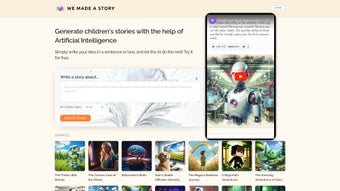
We Made a Story is a free, web‑based AI tool that turns a simple idea into a fully illustrated children’s story. Built for parents, teachers, and budding authors, the platform lets users type a brief prompt—such as “a brave rabbit who loves carrots”—and instantly receives a custom‑written tale complete with a catchy title, age‑appropriate language, and original artwork. The AI can tailor stories for any age bracket, from toddlers (4 years and under) to early teens (13 years and above), ensuring vocabulary, plot complexity, and illustration style match the target audience.
Because it runs entirely in the browser, there’s no need to install bulky software; you just need an internet connection and a modern browser. The service also includes clear Terms of Service and a Privacy Policy, giving users confidence that their data is handled responsibly. Whether you’re looking to spark a child’s imagination, create a classroom reading resource, or generate a quick bedtime story, We Made a Story offers a secure, user‑friendly, and completely free solution.
Key Features, Pros & Cons
- AI‑generated narratives for five age groups (0‑4, 5‑7, 8‑10, 11‑13, 14+)
- Custom titles and story arcs based on user‑provided keywords
- Original, royalty‑free illustrations created on‑the‑fly
- One‑click export to PDF or printable format
- Multilingual support for English, Spanish, French, and German
- Integrated spell‑check and readability scoring
- Secure cloud processing with no local data storage
- Responsive design works on desktop, tablet, and mobile browsers
- Free tier with unlimited story generation; optional premium upgrade for higher‑resolution images
- Comprehensive Terms of Service and Privacy Policy for peace of mind
Pros
- Completely free for basic usage – perfect for families on a budget.
- Instant story creation saves hours compared with manual writing and illustration.
- Age‑specific language ensures the story is appropriate and engaging.
- No software download required; runs in any modern browser.
- High‑quality, unique illustrations add visual appeal without extra cost.
- Multilingual output expands accessibility for non‑English speakers.
- Secure, GDPR‑compliant handling of user data builds trust.
- Export options make it easy to print or share digitally.
Cons
- Internet connection is mandatory; offline use is not possible.
- Premium upgrade required for ultra‑high‑resolution images.
- Illustration style is algorithmic and may not match a specific artistic direction.
- Limited customization beyond the initial prompt (e.g., character names cannot be edited after generation).
- Currently supports only five major languages; smaller language communities are not covered.
Review Summary: We Made a Story delivers a compelling blend of AI‑driven writing and illustration, making it an invaluable resource for educators and families. While the free tier is generous, power users may eventually consider the premium plan for higher‑resolution art.
Getting Started – Installation, Usage & Compatibility
Installation (Zero‑Step Setup)
Because We Made a Story is a cloud‑based web app, there is no traditional installation process. Simply open your preferred browser (Chrome, Edge, Firefox, Safari, or Opera) and navigate to www.wemadeastory.com. The site automatically detects your device and loads the optimal interface.
Step‑by‑Step Usage Guide
- Create an account (optional): While you can generate stories anonymously, registering saves your favorite stories to a personal library.
- Enter a prompt: Type a brief idea, such as “a shy kitten learns to climb a tree,” and select the desired age range.
- Choose illustration preferences: Pick a style (cartoon, watercolor, or sketch) and a color palette if you have a visual theme in mind.
- Generate: Click “Create Story.” The AI composes the narrative, adds dialogue, and produces matching illustrations within seconds.
- Review & edit: You can preview the story page‑by‑page. Minor tweaks to wording are possible via an inline editor.
- Export: When satisfied, hit “Download PDF” or “Print” to obtain a ready‑to‑share file.
Compatibility (Operating Systems & Devices)
The application is built on responsive HTML5 and works flawlessly on Windows 10/11, macOS Ventura and later, Linux distributions with a modern browser, as well as Android 8+ and iOS 13+. Because processing occurs on secure cloud servers, device performance has minimal impact on story generation speed.
Frequently Asked Questions
Is my data stored after I generate a story?
No. All story content is processed in‑memory and discarded after you download or close the session, unless you create an account and explicitly save it to your library.
Can I customize characters after the story is generated?
The free version allows only minor text edits. Full character customization (names, appearances) requires the premium plan, which unlocks a deeper editor.
What age‑group language settings are available?
You can select from five preset age brackets: 0‑4, 5‑7, 8‑10, 11‑13, and 14+. Each bracket adjusts vocabulary, sentence length, and thematic depth automatically.
Is there a limit to how many stories I can generate for free?
The free tier offers unlimited story generation. However, the resolution of illustrations is capped at 1080 p; higher‑resolution images are part of the paid upgrade.
Does the platform support languages other than English?
Yes. Currently, Spanish, French, and German are fully supported for both text and illustration captions. Additional languages are planned for future releases.
Conclusion – Start Creating Stories Today
We Made a Story bridges the gap between imagination and technology, giving anyone the power to produce captivating, illustrated tales with just a few clicks. Its free, web‑based model eliminates barriers to entry, while the AI’s age‑aware storytelling ensures each narrative resonates with its intended audience. Whether you’re a parent looking for a bedtime adventure, a teacher designing custom reading material, or a creative soul experimenting with AI‑driven art, this tool delivers value without the overhead of traditional publishing software.
Ready to spark a new story in your child’s mind? Download We Made a Story now and experience the magic of instant illustration and narrative generation. For educators and frequent users, consider the affordable premium upgrade to unlock high‑resolution artwork and deeper customization. Join the growing community of storytellers who are turning simple ideas into treasured books—one click at a time.



.png)



